Privacy-focused password manager and identity gateway with email aliasing capabilities, built with ASP.NET Core backend, Next.js frontend, and Chrome extension.
Project Overview
●I built Fortress, a privacy-focused password manager and identity gateway designed to securely generate, store, and auto-fill credentials.
●The system includes email aliasing capabilities to prevent identity leakage and protect users from data tracking and spam.
●Fortress is built as a full-stack application with three main components: an ASP.NET Core REST API backend, a Next.js frontend dashboard, and a Chrome/Edge browser extension.
Problem Statement
●Users need a secure way to manage passwords and identities across multiple online services without exposing their real email addresses.
●Traditional password managers lack identity isolation features, making users vulnerable to data breaches and identity tracking.
●Browser-based credential management requires seamless integration with websites while maintaining strict security standards.
●Cryptographic operations must be performed securely on the backend to prevent exposure of encryption keys and sensitive logic to client applications.
Technology Stack Used
●Backend: ASP.NET Core 9, Entity Framework Core, PostgreSQL
●Architecture: Clean Architecture pattern with API, Application, Domain, and Infrastructure layers
System Architecture
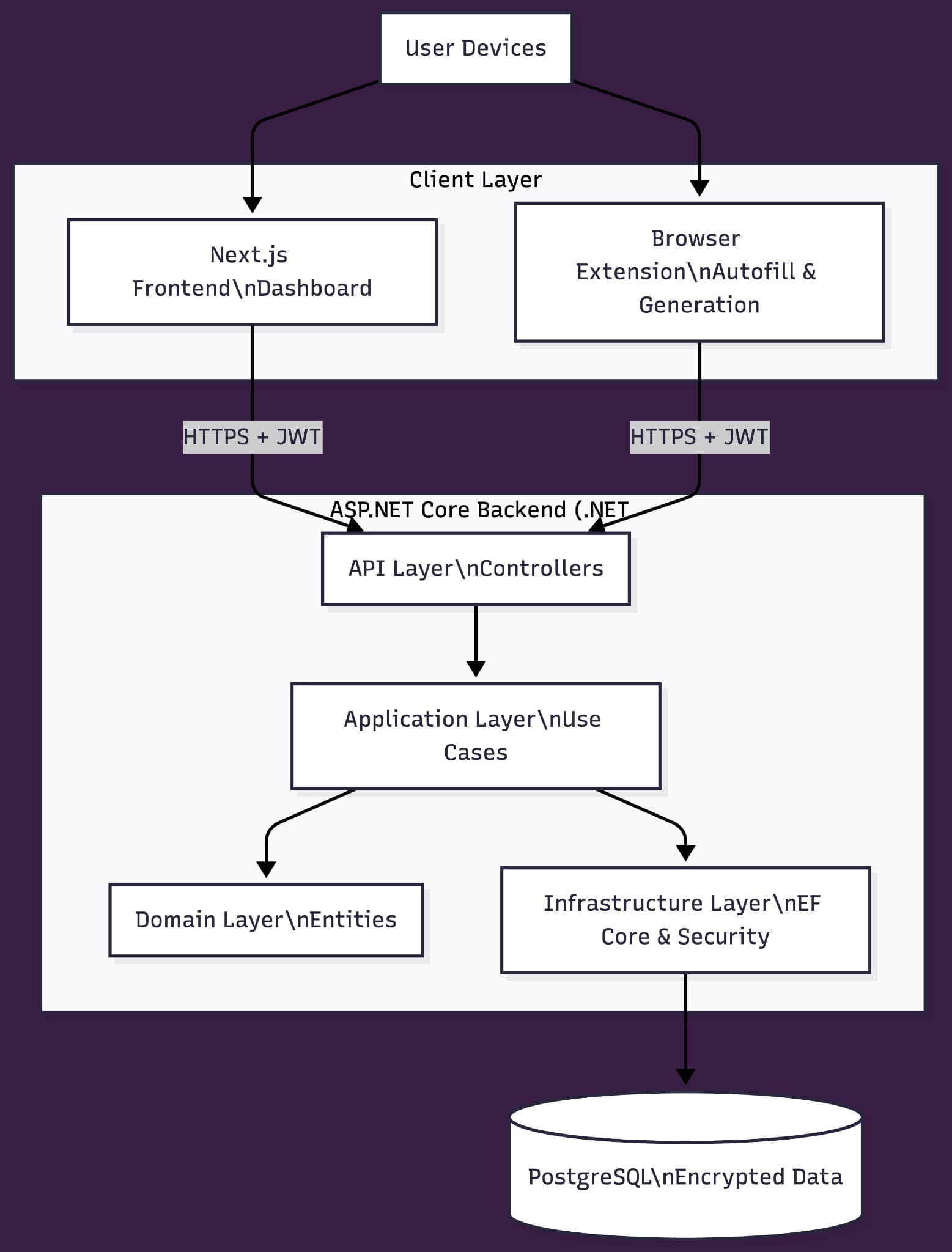
●I architected the backend using Clean Architecture principles, organizing code into four distinct layers: API layer for controllers, Application layer for use cases and business logic, Domain layer for entities, and Infrastructure layer for data access and security.
●The client layer consists of a Next.js frontend dashboard for managing credentials and identities, and a Chrome/Edge browser extension for password generation and auto-fill functionality.
●All client applications communicate with the backend using HTTPS and JWT-secured REST APIs, ensuring authenticated and encrypted communication.
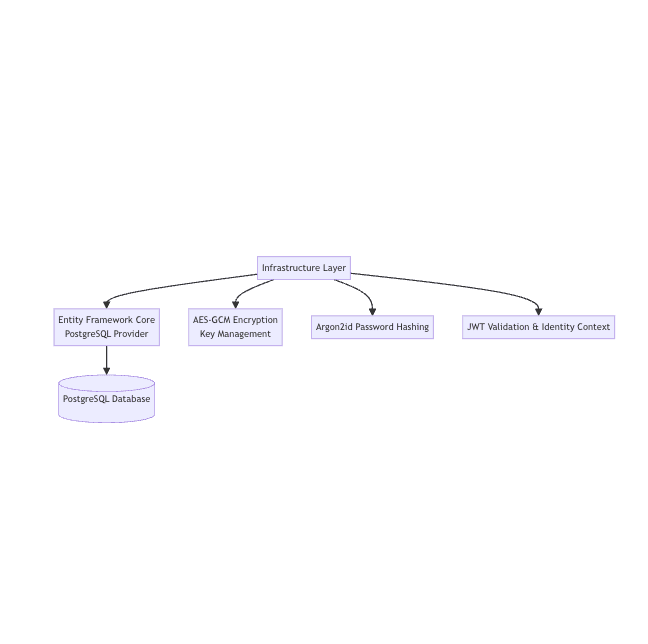
●The Infrastructure layer handles Entity Framework Core with PostgreSQL provider for data persistence, AES-GCM encryption key management for credential encryption, Argon2id password hashing for user authentication, and JWT validation for identity context management.
●PostgreSQL serves as the primary database, storing encrypted credential data and user information securely.
Key Features
●Secure password generation with customizable complexity requirements
●Email alias generation for identity isolation across different online services
●Encrypted credential storage using AES-GCM encryption
●Browser-based auto-fill functionality that detects login forms and injects credentials securely
●Central dashboard for managing identities, credentials, and email aliases
●JWT-based authentication with secure token management
●One-click identity generation directly from browser extension on any website
Implementation Details
●I implemented the backend as an ASP.NET Core 9 REST API following Clean Architecture, with clear separation between API controllers, application use cases, domain entities, and infrastructure concerns.
●The Application layer orchestrates business logic for password generation, email alias creation, credential storage, and retrieval operations.
●I used Entity Framework Core as the ORM for database interactions, configuring it with PostgreSQL provider and implementing database migrations for schema management.
●The Infrastructure layer encapsulates all security operations, including Argon2id password hashing, AES-GCM encryption for stored credentials, and JWT token generation and validation.
●I built the Next.js frontend dashboard to provide a user interface for managing credentials, viewing email aliases, and configuring identity settings.
●The Chrome/Edge browser extension detects login forms on web pages, communicates with the backend API using JWT tokens, and securely injects generated credentials into form fields.
●All cryptographic operations, including password hashing and credential encryption, are performed exclusively on the backend to ensure encryption keys and sensitive logic are never exposed to client applications.
Security & Data Protection
●I implemented JWT-based authentication where tokens are securely generated on the backend and transmitted to clients for subsequent API requests.
●User passwords are hashed using Argon2id algorithm before storage, providing strong protection against brute-force attacks.
●Stored credentials are encrypted using AES-GCM encryption, with encryption keys managed securely on the backend infrastructure layer.
●All API communication between clients and backend is secured using HTTPS, and JWT tokens are required for authenticated requests.
●I ensured that no encryption keys, hashing algorithms, or sensitive cryptographic logic are exposed to the frontend or browser extension.
●The Infrastructure layer handles all security operations, including JWT validation and identity context management, ensuring consistent security enforcement across the application.
●PostgreSQL database stores encrypted data, and Entity Framework Core manages secure database connections and transactions.
Key Achievements
●Built a privacy-focused password manager and identity gateway that securely generates, stores, and auto-fills credentials across websites.
●Architected a full-stack system using Clean Architecture principles with ASP.NET Core 9 REST API backend, Next.js frontend dashboard, and Chrome/Edge browser extension.
●Implemented secure credential storage with AES-GCM encryption and Argon2id password hashing, ensuring all cryptographic operations occur exclusively on the backend.
●Designed email aliasing functionality to prevent identity leakage by generating unique email addresses for each online service.
●Created a browser extension that detects login forms and securely auto-fills credentials using JWT-authenticated API calls.