Chrome Extension-based AI tool that transforms selected text into structured prompts using Gemini AI.
Project Overview
●I built Promptify AI, a Chrome Extension that enables users to transform selected text into structured AI prompts.
●The application runs entirely within the user's browser as a Chrome Extension and communicates with a secure backend to leverage Gemini AI for generating explanations, summaries, comparisons, and structured prompts.
Problem Statement
●Users often struggle to craft effective prompts when working with AI tools.
●Raw text selections need to be transformed into structured, context-aware prompts that produce high-quality AI responses.
●This requires both a seamless user experience within the browser and secure handling of AI API interactions.
System Architecture
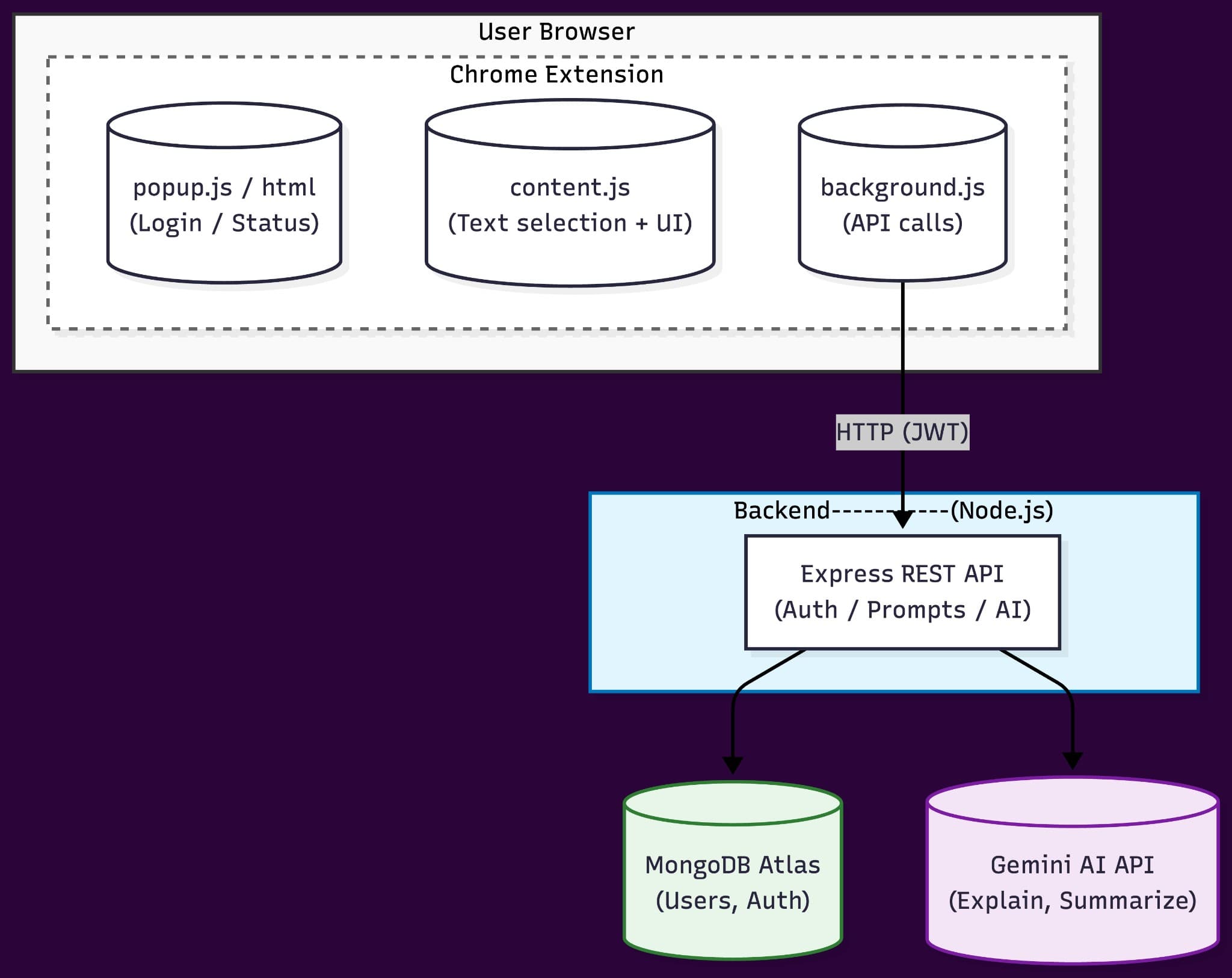
●The application runs as a Chrome Extension inside the user's browser, split into three components: popup.js/popup.html handles authentication and user status, content.js detects selected text and injects UI elements, and background.js serves as a service worker that securely handles API communication.
●The extension communicates with a Node.js Express backend using HTTP requests secured with JWT tokens.
●The backend exposes REST APIs for authentication, prompt generation, and AI requests.
●MongoDB Atlas stores user authentication data securely, and the backend integrates with the Gemini AI API to generate explanations, summaries, comparisons, and structured prompts.
●All API keys and sensitive logic remain server-side and are never exposed to the client.
●I implemented the Chrome Extension using Manifest V3 architecture with separate components for UI, content interaction, and background processing.
●The content.js script uses DOM manipulation to detect text selections and injects a floating UI that appears contextually on web pages.
●The background.js service worker handles all API communication, ensuring that sensitive operations never run in the content script context.
●I designed the backend Express API with RESTful endpoints for authentication, user management, and AI prompt generation.
●I integrated MongoDB Atlas using Mongoose for schema management and implemented JWT-based authentication with bcrypt for password hashing.
●The Gemini AI API integration processes user-selected text and generates structured prompts with appropriate context and formatting.
Security & Authentication
●I implemented JWT-based authentication where tokens are securely stored and transmitted with each API request.
●All authentication endpoints use bcrypt for password hashing, and user credentials are stored securely in MongoDB Atlas.
●API keys for Gemini AI are stored exclusively on the backend server and never exposed to the client.
●The background.js service worker ensures that all API calls are made from a secure context, preventing exposure of sensitive credentials.
●All HTTP communication between the extension and backend is secured with JWT tokens, and I implemented proper error handling to prevent information leakage.
Key Achievements
●Built a Chrome Extension with three-component architecture: popup.js for authentication, content.js for text selection and UI injection, and background.js for secure API communication.
●Architected a Node.js Express REST API backend that handles authentication, prompt generation, and AI requests with JWT-secured endpoints.
●Integrated MongoDB Atlas for secure user authentication data storage and Gemini AI API for generating explanations, summaries, and structured prompts.
●Implemented security-first design ensuring API keys and sensitive logic remain server-side, with all client-server communication secured via JWT tokens.